TraderMake.Money alternative: FOQUS vs TMM
FOQUS fits someone who trades perpetual futures on Binance, Bybit or OKX, or on a MetaTrader 5 account, and wants to see each trade whole: every stop move to the second and the order book around each fill, for free. TraderMake.Money fits someone who also trades spot on one of its 11 exchanges and wants past trades imported right away.
How FOQUS differs from TMM
- Each trade recorded live. FOQUS watches the account from the minute you connect. The entry, every add, each partial close and the exit come in by themselves, each time-stamped to the second.
- The Timeline: a trade to the second. Where the stop stood at entry, each time you moved it, a take-profit you pulled: it is all beside the chart, with funding and the exit. None of the TMM pages checked describes a record of stop moves with the time of each move.
- The order book around each action. For crypto trades, FOQUS saves the spot and perpetual books from a minute before to a minute after each fill. It replays them beside the chart, and an open position shows the book live. 10 recordings a day are free. TMM's pages do not mention order-book recording.
- MAE and MFE on every trade page. They are how far price went against you and in your favour. A candle cannot tell whether its wick came before your entry or after it. So on crypto exchanges FOQUS records the market's trades themselves around your fills. They show which prices came before a fill and which after. On MT5, FOQUS takes MAE and MFE from the broker's floating profit and its one-minute candles. All of this is free. On TMM, MAE and MFE come with the Trader plan.
- MetaTrader 5 next to crypto. Your MT5 accounts join the same journal: forex, gold, indices, whatever your broker offers. TMM's own Myfxbook comparison says it cannot import forex broker accounts. More on the MT5 page.
- The whole journal, free for good. Exchanges, brokers and history from the connection have no limit, all 28 widgets are in, and no card is needed. TMM's free plan is 1 exchange, the trades of the last 31 days and 1 board with 3 widgets.
What MAE and MFE tell you about a stop and an exit is in MAE and MFE in trading.
Why FOQUS does not import old trades
Reviewing a trade takes the whole picture: where the stop stood, how you moved it, what the order book looked like. A venue's history mostly keeps the fills: price, size and fee. The rest is not there, or it soon goes.
- No order book from the moment of a trade. An account's history keeps no book. And the order-book request on Binance, Bybit and OKX returns the current book only.
- Binance and Bybit give a journal a stop that never fired only briefly. Such an order has no fill. Binance stops returning a cancelled stop with no fill 3 days after it was placed. Bybit's order history returns cancelled orders for the last 24 hours only. OKX keeps a cancelled regular order with no fill for 2 hours, and stop orders for 3 months.
- MetaTrader 5 keeps no stop moves at all. An account's history is deals and orders. Moving a stop changes the open position and leaves no entry of its own in the history.
So FOQUS records each trade itself, live, from the minute you connect. A year of fills without context cannot show where your stop stood or what the book looked like. One recorded trade can. A journal that imports old trades takes them from this same history: the fills are there, the order book and long-cancelled stops are not. Trades from before the connection stay where they are: at the exchange, with the broker or in TMM.
FOQUS vs TraderMake.Money at a glance
TMM's side: its pricing, exchange and comparison pages, checked 2026-10-08. FOQUS's side: what its code does and what its pricing says.
| FOQUS | TraderMake.Money | |
|---|---|---|
| How trades arrive | Recorded live from the minute you connect, each action time-stamped to the second | A read-only key or a wallet address; past trades imported at first sync: Binance full history, Bybit 730 days, OKX 90 days |
| Stop-loss changes | Every set, move and cancel while the trade is open, each time-stamped to the second | Not stated on TMM's pages |
| Order-book recordings | Spot and perpetual books, ±1 minute around each fill; 10 a day free | Not stated on TMM's pages |
| MAE and MFE | On every trade page, free; on crypto exchanges from the market's trades around your fills and from candles, on MT5 from the broker's floating profit and candles | On the Trader and PRO Trader plans |
| MetaTrader 5 and forex brokers | Yes: account number, investor password and server; no EA | No: its own page says it cannot import forex broker accounts |
| Free plan | Exchanges, brokers and history without a limit, all 28 widgets; 10 order-book recordings a day | 1 exchange; trades of the last 31 days visible; 1 board with 3 widgets |
| Crypto exchanges | Binance, Bybit, OKX; more coming soon, about 20 planned | 11: Binance, Bybit, OKX, Bitget, Gate.io, MEXC, KuCoin, Kraken, BingX, Hyperliquid, Aster DEX |
| What it journals there | USDT and USDC perpetual futures | Spot and futures (Hyperliquid and Aster DEX: futures) |
| AI | Voice input (dictation), AI questions about each trade, "Improve the text"; AI trade review in development | AI Coach: 1 request on the free plan, about 100 to 300 messages a month on paid plans; an MCP server for Claude and ChatGPT on every plan |
| Export | In development | From Novice+ up |
| Site languages | English, Russian and Ukrainian; the app too | 8 |
| Price | Journal free forever; AI plans later | Free, or $6, $12 or $22 a month billed yearly |

What both journals do
- Read-only connection. Both take a read-only API key and check its rights before they accept it. Neither places orders.
- Net results. Both count fees and funding in a trade's result.
- Notes and voice. Both keep notes on a trade, and both let you dictate one by voice.
- Public profile. Both let you open your journal to others by a link.
- A free start. Neither asks for a card to start.
Who each journal fits
FOQUS fits someone who trades USDT and USDC perpetuals on Binance, Bybit or OKX, or a MetaTrader 5 account, and reviews trades from facts:
- every stop and take-profit, when it was set, moved and cancelled, to the second;
- on exchanges, the order book a minute before and after each fill, 10 recordings a day free;
- crypto and MT5 in one journal;
- a free journal with no limit on exchanges or history.
Today it connects Binance, Bybit, OKX and MT5 brokers. More exchanges are coming soon: about 20 are planned.
TraderMake.Money fits someone who puts other things first:
- spot and futures on 11 crypto exchanges, including COIN-M on Binance, inverse contracts on Bybit and dated futures on OKX;
- past trades at once: at the first sync TMM imports the exchange's history;
- an AI Coach, an MCP server for Claude and ChatGPT and a Telegram bot, available today;
- risk rules tested on past trades, a leaderboard and mentorship;
- export on paid plans, API on Trader and PRO Trader, a site in 8 languages.
TraderMake.Money and FOQUS prices
TMM's pricing page, checked 2026-10-08, shows prices billed yearly:
| Plan | Price | Exchanges | History visible | AI Coach |
|---|---|---|---|---|
| Novice | Free | 1 | Last 31 days | 1 request for the life of the account |
| Novice+ | $6 a month, $72 a year | 3 | 6 months | About 100 messages a month |
| Trader | $12 a month, $144 a year | 6 | Full | About 150 messages a month |
| PRO Trader | $22 a month, $264 a year | Unlimited | Full | About 300 messages a month |
On Novice, older imported trades stay stored and come back into view on a longer plan. A 15-day Trader trial needs no card.
FOQUS costs nothing for the journal and asks for no card. The free plan's limit is 10 order-book recordings a day. A recording is one book, so a fill's spot and perpetual books use two. The paid plans, AI and AI Max, are for the AI trade review that is still being built. They have no price yet, and payments are not switched on.
How to move from TMM to FOQUS
- Leave your past in TMM. FOQUS does not import old trades: their history lacks what it records itself. Your trades stay stored in TMM, and a paid plan there can export them.
- Make a separate read-only key for FOQUS. Then you can revoke one service's key without touching the other. The steps for Binance, Bybit and OKX are in the guide to a read-only API key.
- Add your MT5 account as well, if you have one: TMM cannot import forex broker accounts.
- From then on, FOQUS fills by itself. New trades appear without typing, with their stops and order book. A position opened before the connection stays out.
FAQ
Does TraderMake.Money support MetaTrader 5?
No. TMM's own Myfxbook comparison says it cannot import forex broker accounts, nor stock, options or traditional broker accounts. FOQUS connects an MT5 account with its number, the investor password and the broker's server. That password cannot trade.
Is FOQUS free like TMM's Novice plan?
More of it is free. FOQUS Basic has no limit on exchanges, brokers or history from the connection. TMM's Novice has 1 exchange and shows the last 31 days. FOQUS's free plan has a limit too: 10 order-book recordings a day.
Why doesn't FOQUS import my trades from TMM or the exchange?
Because an old history holds too little to review a trade. It has no order book from the moment of the trade, and a journal can take a stop that never fired from Binance's history for 3 days only, from Bybit's order history for 24 hours. FOQUS records each trade itself, whole, from the minute you connect. Your old trades stay in TMM.
Will FOQUS add more exchanges?
Yes. Today FOQUS connects Binance, Bybit and OKX, and MetaTrader 5 brokers. More exchanges are coming soon: about 20 are planned.
Does FOQUS journal spot trades?
No. FOQUS journals USDT and USDC perpetual futures on Binance, Bybit and OKX. A recording shows the spot book next to the futures book, but spot trades do not enter the journal.
Does FOQUS have an AI coach?
The AI works inside each closed trade. It asks you a few questions about it. You can answer by voice. The "Improve the text" button turns your answers into a clean note. A coach that reviews all your trades at once is not out yet; that review is in development.
FOQUS wrote this page. Facts about TraderMake.Money (TMM) come from TMM's own pages, read on 8 October 2026 and linked below; where TMM says nothing, the cell reads "not stated". Spot an inaccuracy? Email contacts@foqus.pro and we fix it within the day.
Sources
Checked on 8 October 2026:
- TraderMake.Money: Pricing: the plans and yearly prices, exchange connections, the 31-day window on Novice, AI Coach allowances, voice notes, MAE and MFE, export, API access, the MCP server on every plan, the 15-day trial.
- TraderMake.Money: Supported Crypto Exchanges: the 11 exchanges, spot and futures, read-only keys and wallet addresses, how far back each exchange's history is imported.
- TraderMake.Money: A Myfxbook Alternative: TMM cannot import forex broker accounts.
- TraderMake.Money: AI Trading Coach: what the coach reviews; TMM checks a key's permissions before accepting it.
- TraderMake.Money: llms-full.txt: COIN-M on Binance, inverse contracts on Bybit, dated futures on OKX; the Telegram bot, the risk backtester, the leaderboard; every page in 7 more languages.
- Binance API: Query Algo Order: a conditional order that is CANCELED or EXPIRED with no fill is not found 3 days after it was created, and none is after 90 days. New Algo Order is how USDⓈ-M stops and take-profits are placed.
- Binance API: Order Book, Bybit API: Get Orderbook, OKX API: Order book: the order-book request takes an instrument and a depth, never a time, and returns the current book.
- Bybit API: Get Order History: orders that are Cancelled, Rejected or Deactivated are returned for the last 24 hours only; beyond 7 days only orders with fills.
- OKX API: Order history (last 7 days): a cancelled regular order with no fill is kept for 2 hours; Algo order history: stop orders of the last 3 months.
- MQL5: HistorySelect: a MetaTrader 5 account's history is deals and orders; MQL5: Trade Operation Types: TRADE_ACTION_SLTP changes the stop and take-profit of an open position.
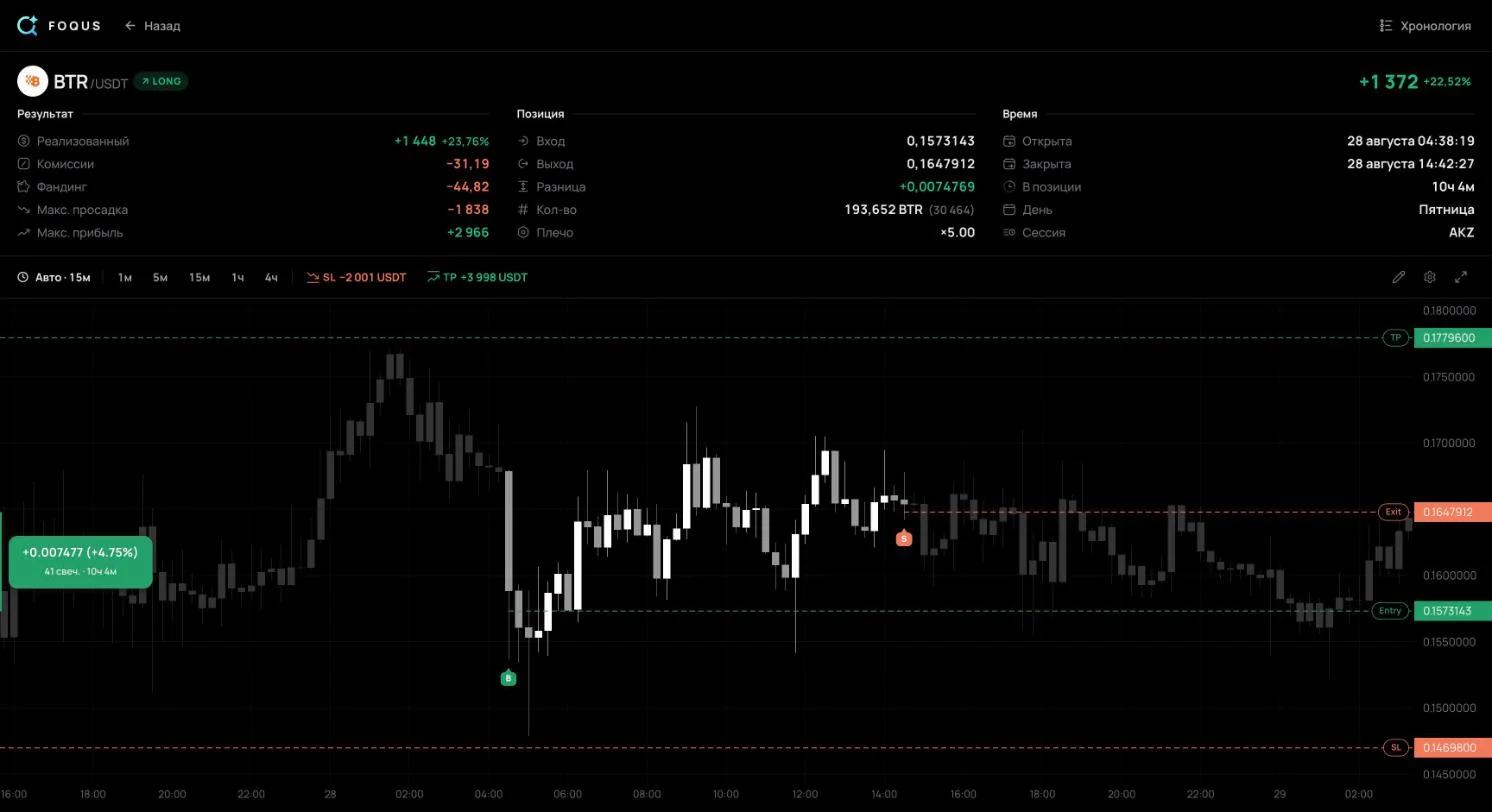
- FOQUS facts: read from its source code, plus the price list on the home page. The plan for more exchanges is the FOQUS team's word. The trade shown is #104 in the author's public journal.
Comparing with a multi-market journal instead? See FOQUS vs TradeZella.