TradeZella alternative: FOQUS vs TradeZella
FOQUS fits a trader of USDT and USDC perpetuals on Binance, Bybit or OKX, or of MetaTrader 5, who wants a free journal that records each action of a trade to the second, together with the order book. TradeZella fits a trader of stocks, options or exchange-traded futures with brokers outside MetaTrader 5 who wants imported history and backtesting, for $35 to $99 a month.
Where FOQUS is different
- Each trade recorded live. FOQUS watches the account from the minute you connect. The entry, every add, each partial close and the exit come in by themselves, each time-stamped to the second.
- A log of what you did, not only of the price. TradeZella's replay moves the market tick by tick. The FOQUS Timeline beside the chart lists your own actions: the entry, every add, each stop and take-profit you set, moved or cancelled, funding, the exit.
- The book at the moment of your fill, for free. For crypto, FOQUS keeps the venue's order book from a minute before to a minute after each fill: the entry, every add or partial close, the exit. Spot sits beside perpetual, and the recording plays next to the chart. 10 recordings a day are free. In TradeZella, Level II in replay comes with the Pro and Ultra plans: from $59 a month, or $44 a month billed yearly.
- MAE and MFE on every trade page. They are how far price went against you and in your favour. A candle cannot tell whether its wick came before your entry or after it. So on crypto exchanges FOQUS records the market's trades themselves around your fills. They show which prices came before a fill and which after. On MT5, FOQUS takes MAE and MFE from the broker's floating profit and its one-minute candles.
- Binance and OKX perpetuals come in by themselves. TradeZella's list has Bybit but neither Binance nor OKX. In FOQUS, a read-only API key is enough on Binance, Bybit (from a Unified Trading Account) and OKX. FOQUS turns away a key that could trade or withdraw.
- MT5 stops as you moved them. A MetaTrader 5 account's history is deals and orders; it holds no stop or take-profit moves. FOQUS records them while it watches the open trade, with commissions and swaps per deal, and shows which level closed the trade. More on the MT5 page.
- Costs inside the result. A trade's result already takes off its fees and funding. A fee paid in BNB is valued in USDT at the BNB price of that time.
- Free, without a trial. The journal is $0 with no card and no end date: every exchange, broker and all 28 widgets are in the free plan. TradeZella's pricing page lists no free plan. The FOQUS app speaks English, Russian and Ukrainian.
Why FOQUS does not import old trades
Reviewing a trade takes the whole picture: where the stop stood, how you moved it, what the order book looked like. A venue's history mostly keeps the fills: price, size and fee. The rest is not there, or it soon goes.
- No order book from the moment of a trade. An account's history keeps no book. And the order-book request on Binance, Bybit and OKX returns the current book only.
- Binance and Bybit give a journal a stop that never fired only briefly. Such an order has no fill. Binance stops returning a cancelled stop with no fill 3 days after it was placed. Bybit's order history returns cancelled orders for the last 24 hours only. OKX keeps a cancelled regular order with no fill for 2 hours, and stop orders for 3 months.
- MetaTrader 5 keeps no stop moves at all. An account's history is deals and orders. Moving a stop changes the open position and leaves no entry of its own in the history.
So FOQUS records each trade itself, live, from the minute you connect. A year of fills without context cannot show where your stop stood or what the book looked like. One recorded trade can. A journal that imports old trades takes them from this same history: the fills are there, the order book and long-cancelled stops are not. Trades from before the connection stay where they are: at the exchange, with the broker or in TradeZella.
FOQUS vs TradeZella at a glance
TradeZella column: its pricing, broker list and integration pages, checked 2026-10-08. FOQUS column: its code and its own price list.
| FOQUS | TradeZella | |
|---|---|---|
| How trades arrive | Recorded live from the minute you connect, each action time-stamped to the second | Auto-sync, file upload or manual entry; past trades imported by sync from a start date, by file or by hand |
| Stop and take-profit history | Every set, move and cancel, each time-stamped to the second | Not stated on the pages checked |
| Market depth | The venue's book, a minute either side of each of your fills, spot and perpetual (crypto); 10 recordings a day free | Level II and Time & Sales data in Trade Replay on Pro and Ultra; markets not stated |
| Binance | Automatic, with a read-only API key | Not in its broker list; a generic CSV upload for unlisted brokers |
| Bybit | Automatic, with a read-only API key | Auto-sync (futures) |
| OKX | Automatic, with a read-only API key | Not in its broker list; generic CSV upload |
| MetaTrader 5 | Automatic: account number, investor password and server; no EA | Auto-sync with the investor password, or an HTML report upload |
| Markets | USDT and USDC perpetual futures on Binance, Bybit and OKX; whatever your MetaTrader 5 broker offers; more exchanges coming soon, about 20 planned | Stocks, options, futures, forex and crypto; 500+ brokers and prop firms by its own count, MT4, cTrader, Tradovate and NinjaTrader among them |
| Replay and backtesting | A trade's Timeline and order-book playback; no backtesting | Tick-by-tick trade replay on Pro and Ultra; backtesting on 11+ years of data |
| AI | Voice input (dictation), AI questions about each trade, "Improve the text"; AI trade review in development | Zella AI on every plan, 500 to 3,000 credits a month; AI agents on Pro and Ultra |
| CSV export | In development | Yes, from the Trade Log |
| Price | $0 for the journal; 10 order-book recordings a day free | $35, $59 or $99 a month; no free plan on its pricing page |

Who each journal fits
FOQUS fits someone who trades USDT and USDC perpetuals on Binance, Bybit or OKX, or a MetaTrader 5 account, and reviews trades from facts:
- every stop and take-profit to the second, on MT5 too, where the account history keeps no moves;
- on exchanges, the order book a minute before and after each fill, 10 recordings a day free;
- Binance and OKX with a read-only key, no files;
- a $0 journal with no end date and no card.
Today it connects Binance, Bybit, OKX and MT5 brokers. More exchanges are coming soon: about 20 are planned.
TradeZella fits someone who puts other things first:
- stocks, options and exchange-traded futures with brokers outside MetaTrader 5; 500+ brokers and prop firms by its own count: MetaTrader 4 and 5, cTrader, Tradovate, NinjaTrader, Interactive Brokers and more;
- imports of trades made before signing up, by sync, file or hand;
- Zella AI and its AI agents, backtesting on 11+ years of data and tick-by-tick trade replay;
- Prop Firm Sync, Mentor Mode, Spaces, Zella University courses and CSV export.
TradeZella and FOQUS prices
TradeZella's pricing page, checked 2026-10-08:
| Plan | Monthly | Billed yearly | What sets it apart |
|---|---|---|---|
| Essential | $35 | $26 a month, $315 a year | 1 account, 500 AI credits, no trade replay |
| Pro | $59 | $44 a month, $531 a year | Up to 50 accounts, 1,500 AI credits, replay, AI agents |
| Ultra | $99 | $74 a month, $891 a year | Unlimited accounts, 3,000 AI credits |
Yearly billing takes 25% off: a year of Essential costs $315 instead of $420. The pricing page lists no free plan.
FOQUS has one plan you can use today, Basic, at $0 with no card and no end date. Exchanges, brokers and history are unlimited, all 28 widgets are in, and so are the Timeline, chart markup, notes and 10 order-book recordings a day. A recording is one book, so a fill's spot and perpetual books use two of the ten. The paid plans, AI and AI Max, are for the AI trade review now in development. Their prices are set at launch.
How to switch from TradeZella to FOQUS
- Leave your past in TradeZella. FOQUS does not import old trades: their history has no order book from the moment of the trade. Save your Trade Log as CSV in TradeZella if you want a copy outside it.
- Give FOQUS a key of its own. Create a new read-only key on the exchange; the read-only API key guide walks through the steps on each one. An MT5 account needs its number, the investor password and the broker's server.
- Connect and keep trading. Trades you open after that appear in the journal by themselves, with their stops and order book. A position that was already open stays out.
- Overlap is safe. Neither journal places orders, so you can keep TradeZella until you are sure.
Not ready to connect a live account? FOQUS also has a virtual account on live market prices to try it first.
FAQ
Is there a free TradeZella alternative for crypto futures?
Yes: FOQUS is free forever for USDT and USDC perpetual futures on Binance, Bybit and OKX and for MetaTrader 5 accounts. It connects no stock, options or futures brokers outside MetaTrader 5. For those markets, TradeZella fits.
Does TradeZella support Binance or OKX?
Its broker list, checked on 8 October 2026, names Bybit and Coinbase among crypto venues, but not Binance or OKX. For a broker it does not list, TradeZella offers a generic CSV upload and manual entry.
Why doesn't FOQUS import my trades from TradeZella or the exchange?
Because an old history holds too little to review a trade. It has no order book from the moment of the trade, and a journal can take a stop that never fired from Binance's history for 3 days only, from Bybit's order history for 24 hours. FOQUS records each trade itself, whole, from the minute you connect. Your old trades stay in TradeZella and in its CSV export.
Will FOQUS add more exchanges?
Yes. Today FOQUS connects Binance, Bybit and OKX, and MetaTrader 5 brokers. More exchanges are coming soon: about 20 are planned.
Does FOQUS have AI like Zella AI?
The AI works inside each trade. You can dictate a note by voice. On a closed trade, the AI asks you questions about it. The "Improve the text" button turns your answers into a clean note. A review that compares all your trades and finds what repeats is in development.
Can I journal a prop-firm account?
Yes, if it is a MetaTrader 5 account. It connects like any MT5 account: account number, investor password and server. When the firm issues a new account, enter the new login and password in Edit account, and the journal carries on in the same FOQUS account; that works if the server and the account currency are the same and no position is open. Every stop move is recorded to the second, though MT5's own history keeps none. FOQUS does not track a firm's rules, such as a daily loss limit.
FOQUS wrote this page. Facts about TradeZella come from TradeZella's own pages, read on 8 October 2026 and linked below; where TradeZella says nothing, the cell reads "not stated". Spot an inaccuracy? Email contacts@foqus.pro and we fix it within the day.
Sources
Checked on 8 October 2026:
- TradeZella: Pricing: the plans and their monthly and yearly prices, accounts, AI credits, Zella AI and its agents, Trade Replay with Level II and Time & Sales data on Pro and Ultra, backtesting on 11+ years of data, Prop Firm Sync, Mentor Mode, Spaces, Zella University, 500+ brokers.
- TradeZella: Supported Brokers: the markets, the brokers with auto-sync or file upload, Bybit and Coinbase among crypto venues, the generic import. Binance and OKX are not in the list.
- TradeZella: How to Import Trades from Unsupported Broker via Generic CSV File Upload: a broker TradeZella doesn't support directly comes in through the Generic CSV upload.
- TradeZella: How to use MetaTrader 5 with TradeZella: auto-sync with the investor password, a blank start date imports all records, the HTML report upload.
- TradeZella: How to export data to a CSV file from the Trade Log: CSV export.
- Binance API: Query Algo Order: a conditional order that is CANCELED or EXPIRED with no fill is not found 3 days after it was created, and none is after 90 days. New Algo Order is how USDⓈ-M stops and take-profits are placed.
- Binance API: Order Book, Bybit API: Get Orderbook, OKX API: Order book: the order-book request takes an instrument and a depth, never a time, and returns the current book.
- Bybit API: Get Order History: orders that are Cancelled, Rejected or Deactivated are returned for the last 24 hours only; beyond 7 days only orders with fills.
- OKX API: Order history (last 7 days): a cancelled regular order with no fill is kept for 2 hours; Algo order history: stop orders of the last 3 months.
- MQL5: HistorySelect: a MetaTrader 5 account's history is deals and orders; MQL5: Trade Operation Types: TRADE_ACTION_SLTP changes the stop and take-profit of an open position.
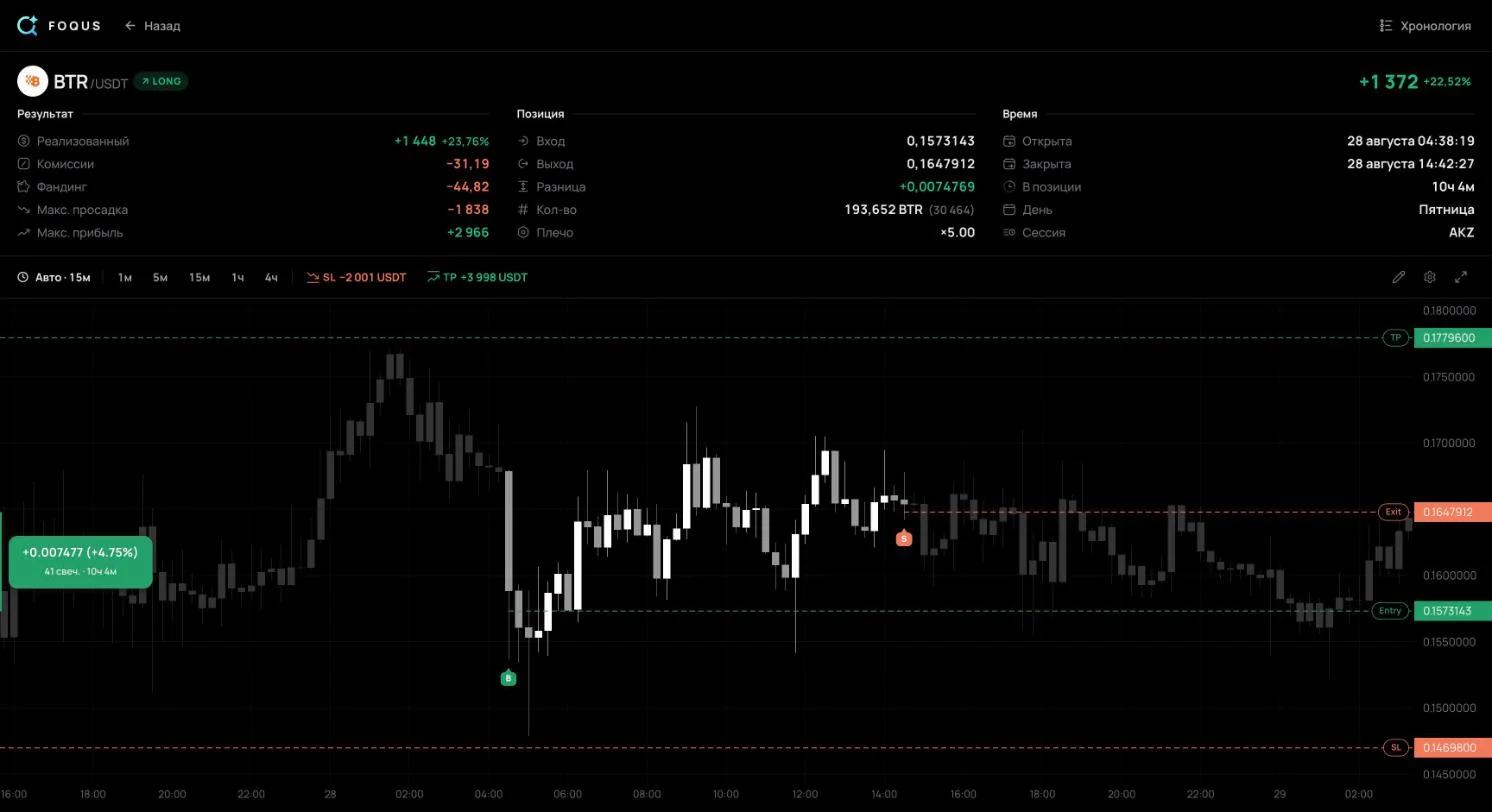
- FOQUS: its venues, key check, Timeline and order-book recording are described from its code; its price from the home page. The plan for more exchanges is the FOQUS team's word. Trade #104 comes from the author's public journal.
For a crypto-only rival, see FOQUS vs TraderMake.Money.